If you’ve made it this far in the series, congratulations!

Credit: Amanda Cee Media

Credit: Brooklyn Nine-Nine
This one will read more like a step-by-step tutorial (For free?! Yep.). If you read the first two blogs, this one will transform you from a stressed-out business owner who swears they’ll “look at the data later” to a marketing wizard.
Learn how to get answers to your most asked data questions, like: Who’s coming to your site? How did they get there? What did they do? Did it actually matter?
By the end, you’ll know exactly which metrics matter and how to use them to make ROI-focused SEO decisions.
Let’s get into it.
What Are the Most Important SEO Analytics to Track in GA4?
When it comes to using GA4 for SEO analytics, the real value lies in going beyond surface-level traffic metrics. Instead of just looking at how many people visit your site, you want to understand how they got there, what they did, and whether they took action.
Below are the most important SEO-focused data points to monitor, why each one matters and how to track them:
1. Organic Traffic by Source/Medium
Start by identifying how much of your traffic is actually coming from search engines.
How to track it:
Go to Reports > Acquisition > Traffic Acquisition, then filter by Medium = Organic.
This tells you how effective your SEO efforts are in driving visibility compared to other channels (paid, social, referral, etc.).
2. Landing Page Performance
Landing pages are often the first touchpoint in a search user’s journey, which makes them one of the strongest indicators of whether your SEO (and website!) is actually working. If a page ranks well, attracts the right searchers, and keeps them engaged once they arrive, it’s a sign that your keywords, content, and user experience are aligned with what people are looking for. So you’ll want to keep an eye on your landing page performance.
How to track it:
Use Reports > Engagement > Pages and Screens
This shows you which pages are bringing in organic traffic and how they’re performing.
Focus on:
- Engagement rate (total number of engagements divided by followers or reach)
- Average engagement time (the average length of time a user actively spends clicking around on your website)
- Conversions tied to landing pages (what your user does on your page that results in a conversion, such as filling out a form, making a purchase, or signing up for a newsletter)
This helps you identify which pages are optimized well for both SEO (brings users to your site) and user experience (keeps them on your site) and which ones may need improvement.
3. Event Conversions (SEO Goals)
I know you’re having fun playing detective (we are too!), but of course, the point of all this is to grow your bottom line.

Credit: Top Movie Quotes
So one of the most critical parts of SEO analytics is tying it back to business outcomes. In GA4-speak, this means setting up key events, or conversion events.
Start with these:
- Form submissions
- Clicks on key CTAs (call-to-action)
- Product views or adds to cart
- Newsletter signups
Tracking these events allows you to measure which organic landing pages and keywords are actually driving results (sales, etc.), not just traffic. Need more guidance? Check out this Google article for more how-to details.
4. Engaged Sessions
In GA4, an “engaged session” means the user stayed on your site for at least 10 seconds, viewed multiple pages, or triggered a conversion event.
This is important data because:
High engagement: signals your content is aligned with search intent. (Translation: your audience is finding you, and you’re doing it right!)
Low engagement: could indicate a mismatch between the search query and your content or a UX issue. (Translation: your audience is lost, and you need to find out why.)
How to track it:
Go to Reports > Engagement > Pages and Screens
Review each page’s Engagement Rate to see how well users are interacting with your content.
Pages with high traffic but low engagement usually signal a problem – either the content isn’t matching what users expected, or something on the page is causing them to leave quickly.
Pages with high engagement and conversions are your strongest performers and can guide your content strategy.
Use these insights to decide which pages need updates, stronger CTAs, or UX (user experience) improvements.
5. New Users Vs. Organic Search
When it comes to SEO, a true sign you’re doing it right is how many new audience members are finding you. Tracking repeat visitors doesn’t tell the same story. To get the best picture, segment your audience to track new users coming from organic search.
Organic visitors: are users who find your site through unpaid search engine results.
New visitors: are users who are landing on your site for the first time.
This tells you how effective your SEO efforts are in expanding reach (finding new potential customers).

Credit: Peacock
How to track it:
Go to User Acquisition and apply the filters Default Channel Grouping = Organic Search and New Users.
When combined, the Organic + New segment isolates first-time users who discovered you through search, one of the most powerful indicators of growing visibility and brand discovery through SEO. In other words, this gives you answers to key strategic questions. Yes, it tells you if you’re attracting net new visitors through search, or just re-engaging existing ones.
But it also answers:
- Which landing pages are most effective at reaching new audiences?
- Which search queries are introducing people to our brand for the first time?
- Are our SEO driven content updates successfully expanding our top-of-funnel reach?
Bonus Tip:
By tying new organic sessions to conversion events, you can also understand which content is not just attracting new users but actually converting them.

Credit: Giphy
How to track it:
Go to Reports > Acquisition > User Acquisition. Filter by Default Channel Grouping = Organic Search. User Type = New Users
Bottom line? If you’re growing your new organic users by 7-10% each quarter, you’re on track. If you’re seeing 20%-plus, congratulations – you’re crushing it.
6. Scroll and Behavior Tracking
GA4 doesn’t offer heatmaps (visual maps that show where users click, scroll, and spend the most time on a page), but you can set up custom events to understand how users are engaging with SEO-driven content.
Set up events for:
- Scrolls
- Video plays
- Image views
- CTA clicks
How to track it:
Go to Reports > Engagement > Events to review GA4’s automatic scroll event. Set up additional custom events (like deeper scroll depth, video plays, or CTA clicks) in Admin > Events or Google Tag Manager.
This provides insight into how well your content is capturing their attention, if there are any UX issues, and where users are dropping off in their journey (you’re losing them).

Credit: Tenor
7. Search Console Integration for Keyword Visibility
Before you can optimize your content, you need to understand exactly what people are typing into Google to find you. That’s where Google Search Console (a free tool that shows how your site appears and performs in Google search results) comes in. Linking GA4 with Google Search Console gives you access to query-level insights that GA4 alone doesn’t provide.
You’ll be able to see:
- Top performing search queries
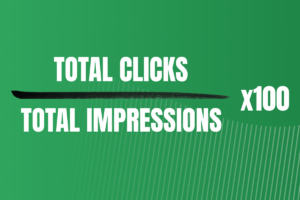
- Impressions vs. clicks
- Click-through rates (CTR)
- Average search position
How to do it:
Go to Admin > Product Links > Search Console in GA4 and follow the prompts to connect your GA4 property with your verified Search Console account. Once linked, view keyword and query insights under Reports > Acquisition > Search Console.
This is no longer optional – it is critical. If you want to identify which keywords are delivering results and spotting opportunities to optimize content further (and you do!), make sure you link this. Bonus: tie these insights to specific conversion goals and keyword strategies to help you move from passive reporting to active optimization.
It’s not just about knowing where your traffic comes from; it’s about knowing what that traffic does, why it matters, and how to make it perform better.

Credit: Giphy
You Did It!
If you made it all the way through this guide, give yourself a high-five (or at least a fresh cup of coffee). You’ve just unlocked the side of GA4 that shows not just who is finding you, but why it matters. With these metrics in your toolkit, you can confidently track what’s working, improve what isn’t, and make data-backed decisions that actually support your growth.
And we’re not done yet!
In the next blog, we’ll show you how to use this data to increase conversions and turn all that new insight into real results. (No; we’re not sure if we should be giving this away for free, either.)

Credit: Giphy